SSIS ETLs
The Report Metadata and Run Data ETL’s are SSIS packages and can be scheduled to run as jobs on a Microsoft SQL Server. The metadata ETL can be scheduled to run at a fairly frequent interval - every hour or few hours for example - while the run data ETL can be run daily.
The Clarity ETL must be downloaded from the data handbook.
∞ Metadata ETL
The metadata ETL is composed of multiple SSIS packages - basically one package per source system. There is a setup ETL that creates the database tables needed for the data merge, and then each other ETL will create their own specific data tables.
∞ Steps to Run
-
Configure and run the supplementary ETLs
-
Configure and run Atlas ETL’s (main ETL and run data)
- Delete SSRS sections if not used
- Update Clarity server and credentials
- Update Database connection strings
- Schedule ETL’s in SQL Agent Jobs
∞ Requirements
- Install Visual Studio 2017. The community edition works well.
- Visual Studio’s
SQL Server Integration Services Projectsextension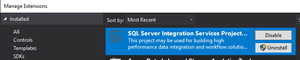
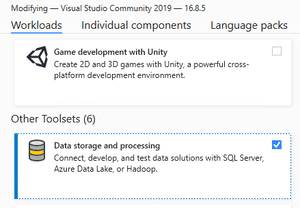
Data Storage and Processingcomponent