Webserver Setup
Atlas Library is designed to run on Windows Server 2016 or later. There are a few installs to get the website running.
∞ Server Requirements
A single hospital install will generally have ~50gb of data. A majority of the data is report usage data. Here is a rule of thumb sizing for a single hospital. You can scale the numbers to your size -
- Database Server Ram: 50gb
- Database Server Disk Space: 120gb (keep in mind the ETL’s use a staging database, so you need effectively 2x the disk space of the prod database.)
- Server cores: 8
The website server requirements are much less. The website requires <5gb of disk space. On a shared webserver we would recommend 16gb ram and 8 cores.
∞ Install Requirements
-
IIS Webserver with Microsoft .NET SDK 8 (Hosting Bundle)
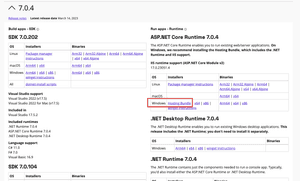
-
Ensure the following tools are installed via
Server Manager>Manage>Add Roles and Features>IIS:- Common HTTP Features
- Health and Diagnostics
- Static Content Compression
- Security
- .Net Extensibility 4
- asp.net 4
- IIS Management Console
- IIS Management Scripts and Tools
- Management Services
-
Java JRE. You can check your current install by running
java --versionin command prompt. Java can be downloaded here.- Add a system environment variable “JAVA_HOME” that points to the install path of java. Most likely something close to
C:\Program Files\Java\jdk-17.0.1
- Add a system environment variable “JAVA_HOME” that points to the install path of java. Most likely something close to

∞ Setup IIS
Open the Internet Information Services (IIS) Manager on your Windows Server.
First, create a new site by right clicking on Site then Create New Site.

Next, fill out the require parameters. If you have setup a DNS you can enter it in the Host name box.

Attention
Finally, verify that windows authentication is enabled and all other methods are disabled.

